I was recently asked about my experience with Google’s Analytics API, my reply was bla, bla, bla, I do not have any experience with their API’s. But to be honest I couldn’t remember why at that moment I didn’t. I think the only reason was because of their documentation, for some of their API’s it’s a pretty long, difficult read. But overall that wasn’t a very good reason, so I decided to take some time and dive in and whoop that trick (line from the hustle and flow movie).
The goal for this post to help anyone who may be having a hard time understanding how to build a connection to Google’s Analytics API.
So first there are a couple of things you need to know.
- In this post I’m only talking about their Data Export API – http://code.google.com/apis/analytics/
- PHP and cURL is a major component in this Class
There are only two files needed in this script but the connection part is the only part we will be going over, it’s in the gaClass.php file.
So basically I’m still new to Google’s Analytics API but what I’ve learned so far is that once you’ve established a connection the rest is pretty simple. So basically that’s why we will be focusing on the establishing a connection part only.
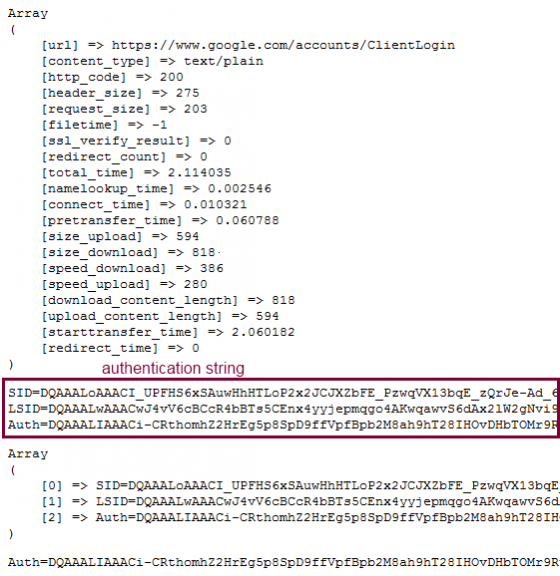
Your first major goal while trying to establish a connection is to collect the authentication string. Within that string is your authentication token, and without that token you can’t get anywhere so remember that. The overall objective is to get the authentication token.
So open up the gaClass.php file and take a look at the construct method, this is where the connection happens. Please contact me if I confuse your somewhere, I try to code so that it’s easy to follow.
- Within the construct method we start off by collection your email and password that was set on the form page. They of course are needed to connect to your account.
- We set the url that we will be trying to making a connection to. In this case it’s the ClientLogin URL (https://www.google.com/accounts/ClientLogin) . Take note that the protocol starts with HTTPS.
- Within our POST request we have a few additional parameters that will need to be pass along including your email and password. A short description of these parameters can be found at (http://code.google.com/apis/analytics/docs/gdata/gdataAuthentication.html) scroll down until you see the HTTP Protocol Details heading
- Now once we have all the parameters set we will try to actually make the connection. We do this within the next method. The curlConnection method, and it does exactly what it says, tries to makes the connection via cURL
- The curlConnection method will take the parameters we talked about earlier and send them to the ClientLogin URL via cURL using a POST method. The answer we receive from this post will or will not include our authentication token.
- Now let’s suppose it does and the header status code equal 200, which means it’s A-OK. Within that connection response output you will see a encrypted string. But look closers you’ll see three variables with three values assigned to it. The variables are labeled , “SID”, “LSID” and “AUTH”. Well you want the AUTH and it value. Our next task is to parse out the AUTH variable and its value, and we do this with the setAccessToken method.
- The setAccessToken is fairly simple we take that string and convert it to an array using PHP’s built in explode function. The access token should be in the second element. I then assign this value to a token variable to be used later for accessing other parts of the API. If you recall when we started this post the authentication token is essential to other parts of the API. Without it you basically can’t do anything.
So that you can get a idea of what the output data look like. I’ve included a screen shot of the header response output, the authentication output, when the authentication output is converted into a array, and the authentication token.
I’m new to Mercurial so please don’t give me a hard time about my commits or the lack of.
https://bitbucket.org/josephtinsley/google-analytics-api/overview